BeavHR replaces the spreadsheets, the biometric exports and the separate payroll file.
Government contributions and withholding tax are computed for you, and every employee
can see their own payslips, leave balances and schedules.
The statutory parts of payroll are built in and computed every cutoff, so you don't keep a separate spreadsheet for them.
SSS, PhilHealth and Pag-IBIGEmployee and employer shares from the contribution tables, on every payslip and in the contribution reports.
BIR withholding taxTax is computed from the BIR tax tables each cutoff and reported per employee.
Labor Code premium payHoliday, rest day, overtime and night differential rates are applied for you. The Philippine holiday calendar comes preloaded.
13th month payComputed from the year's basic pay and ready to release with payroll.
Service Incentive LeaveSIL grants, accrual, carry-over and forfeiture, applied as your policy says.
Final pay and clearanceClearance, exit interview and final pay computation, approval and release when someone leaves.
Your brand, not ours.
BeavHR is white-labelled. Your employees log in at your own address and see your company
name, your logo and your colour on every screen. Swipe through to see the same dashboard
for different companies.
BeavHR
The companies shown here, apart from BeavHR, are made up for illustration.
Everything in BeavHR
One system for the whole employee record, from the day someone applies to their final pay. You switch on only the modules your company uses.
Employee records and organization
The 201 file and the structure around it, from hiring day to last day.
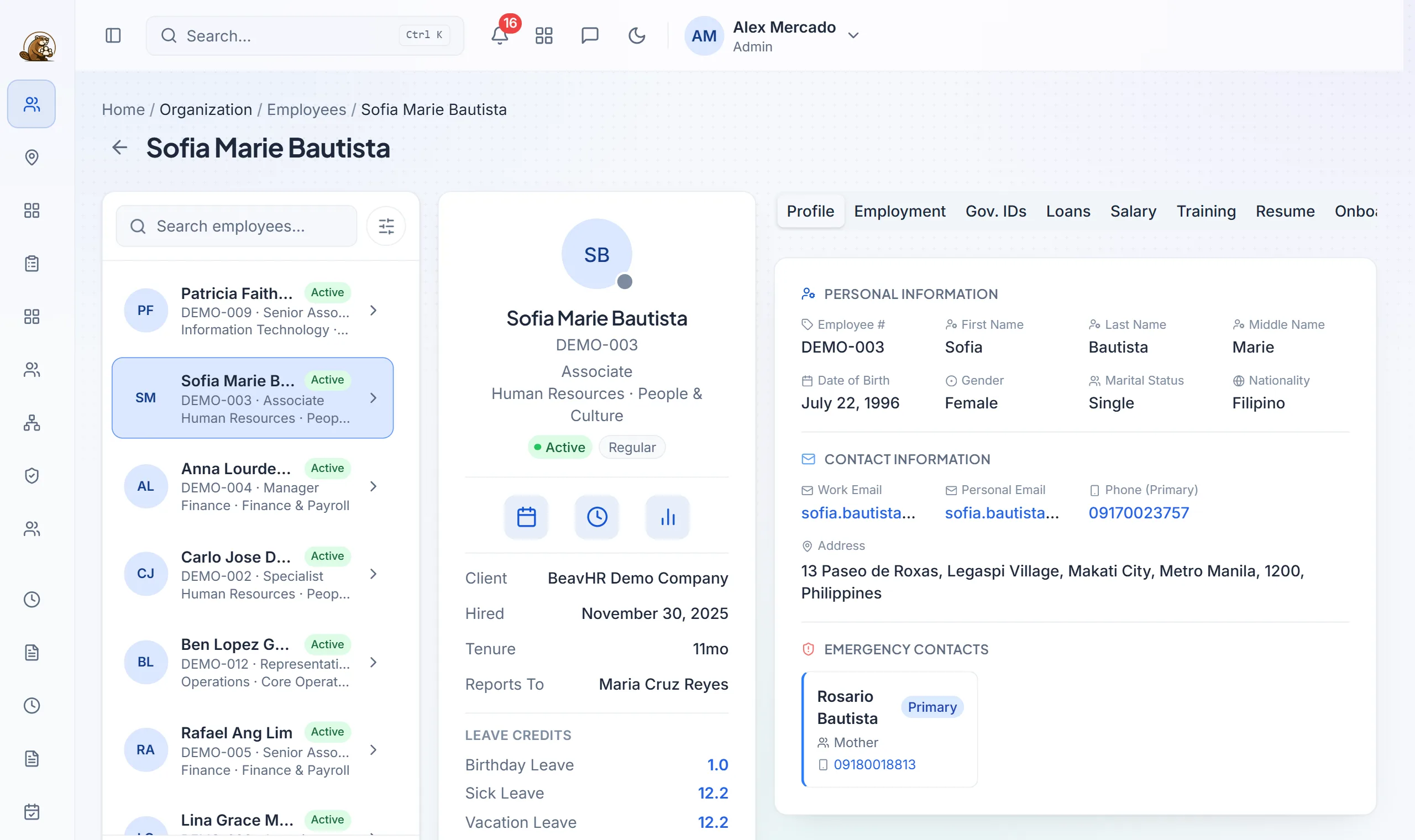
Complete 201 filesProfiles, government IDs, emergency contacts, bank details, photos and documents for every employee.
Bulk import and exportBring employees in from Excel with a preview and an error file, and export any list back out.
Org structureDepartments, positions, teams and employment types, each importable from Excel.
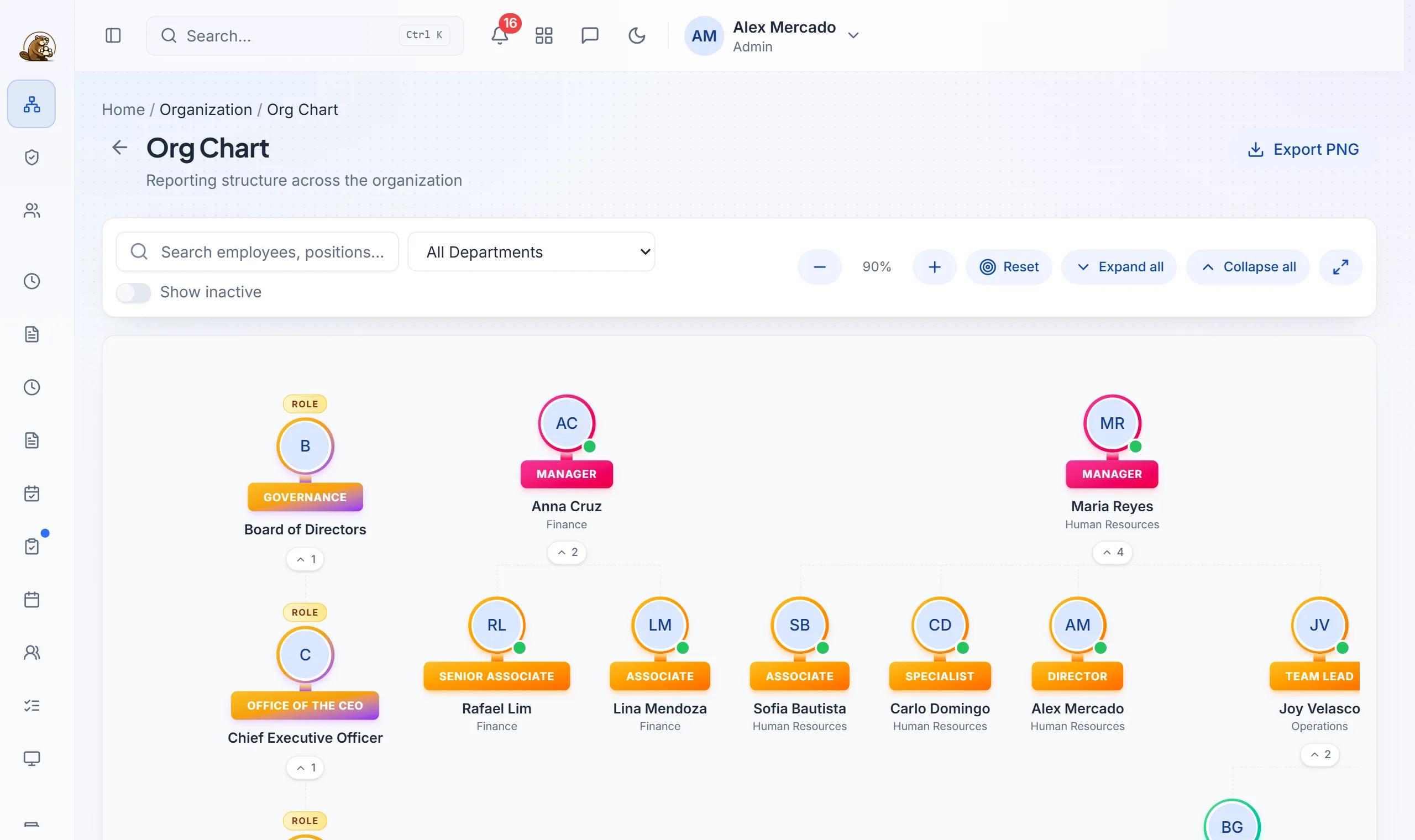
Org chart and team directoryAn interactive chart of who leads whom, which employees can see too.
Onboarding checklistsTemplates that give every new hire the same steps in their first weeks.
Offboarding and final payClearance, exit interviews, exit analytics, and final pay from computation through release.
Multiple companiesRun several companies from one installation, each with its own industry and timezone.
Guided company setupA first-run wizard walks you through your company details before anyone logs in.
An employee's 201 file: personal and contact details, emergency contacts, leave credits, and tabs for employment, government IDs, loans, salary and more.
The org chart, built from your teams and reporting lines.
Time and attendance
Every punch from every source, checked and ready for payroll.
Clock in from phone or browserPhoto capture and geofencing. Punches made without signal are saved and synced once the phone is back online.
QR code clock-inScan a short-lived QR code or open a link to clock in from a phone.
ZKTeco biometric syncPunches come in from your devices and are matched to employees, and any that don't match are queued for review.
Schedules and shiftsRegular and special schedules for each employee. Everyone can see their own.
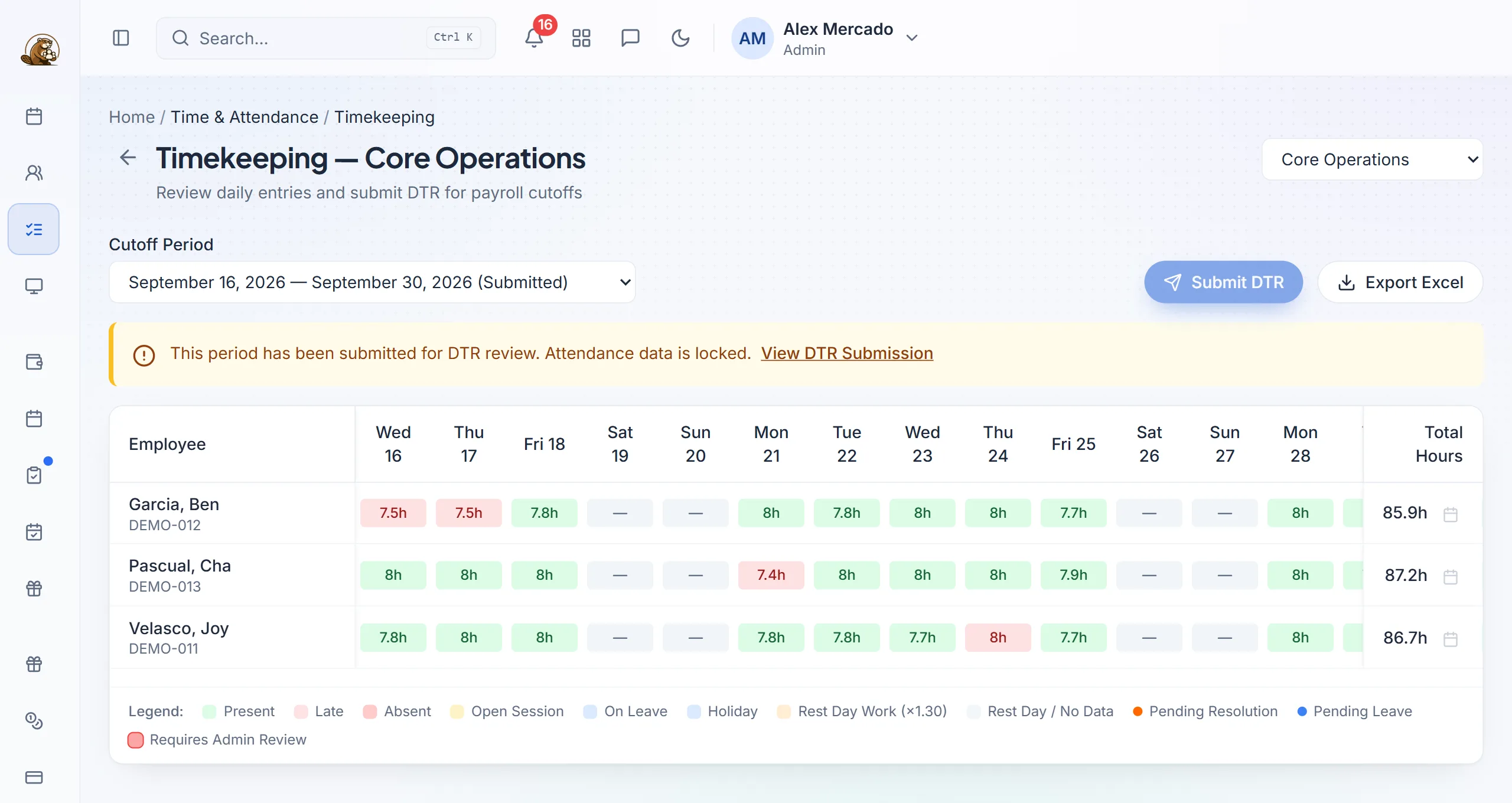
Timekeeping and DTRA cutoff grid of time entries. Employees submit their DTR and HR reviews it before payroll.
Attendance correctionsEmployees request a fix for a missed or wrong punch, and their team leader approves it.
Late and overtime monitoringLate-arrival alerts, and overtime that has to be approved before it's paid.
Team boardTeam leaders see who's in, their team's DTRs and a live map.
Timekeeping for a cutoff, with hours per day, lates in red, and totals ready for DTR review.
Leave
Your own leave policy, applied automatically and fed straight into payroll.
Filing and approvalsEmployees file from the web or their phone, team leaders approve, and balances update right away.
Your own leave typesSet up your leave types with daily accrual and annual resets.
Service Incentive LeaveSIL grants that follow the Labor Code.
Carry-over and forfeitureSet rules per leave type, with a report of what carried over and what lapsed.
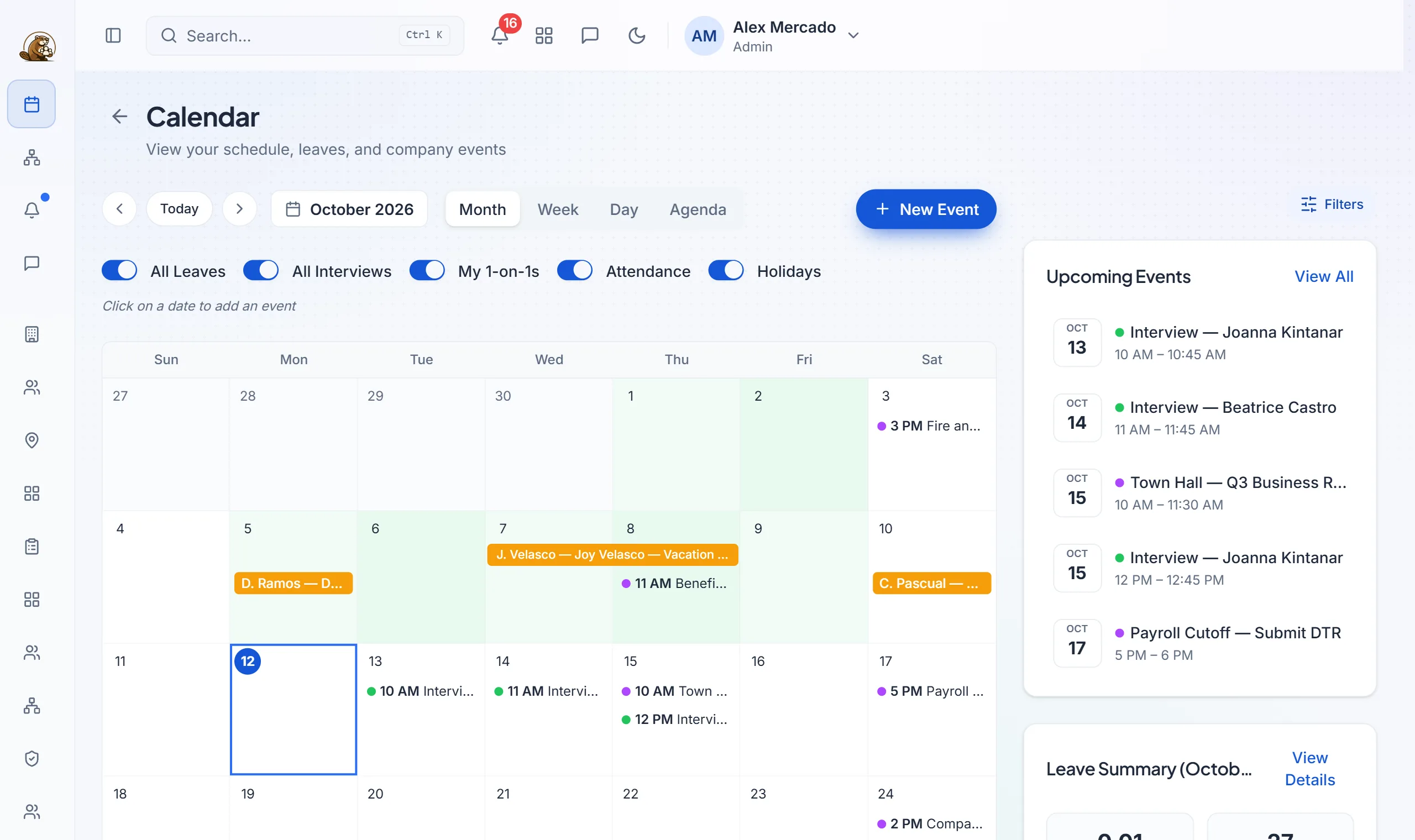
Leave calendarSee who's out on any day, and get a warning when leave requests clash.
Leave sits on the same calendar as interviews, one-on-ones, holidays and company events.
Payroll and compliance
Attendance, leave and overtime flow in, and payslips come out.
Payroll runs per cutoffSemi-monthly or monthly runs, with a payroll dashboard for the period.
Salaries and pay componentsEarnings, allowances and deductions set up your way, with salary import from Excel.
Contributions and taxSSS, PhilHealth, Pag-IBIG and withholding tax every cutoff, with premium pay under the Labor Code.
PayslipsPDF payslips emailed to each employee and kept in their portal.
13th month payComputed and released from the same records as regular payroll.
Employee loansLoan balances are deducted automatically each payroll until they're paid off.
Compensation reviewsCompensation packages and salary review rounds.
Restricted salariesHide selected salaries, such as executives', from payroll staff.
Payroll reportsPayroll register, contributions with employer shares, tax withheld, component breakdowns and trends, all exportable.
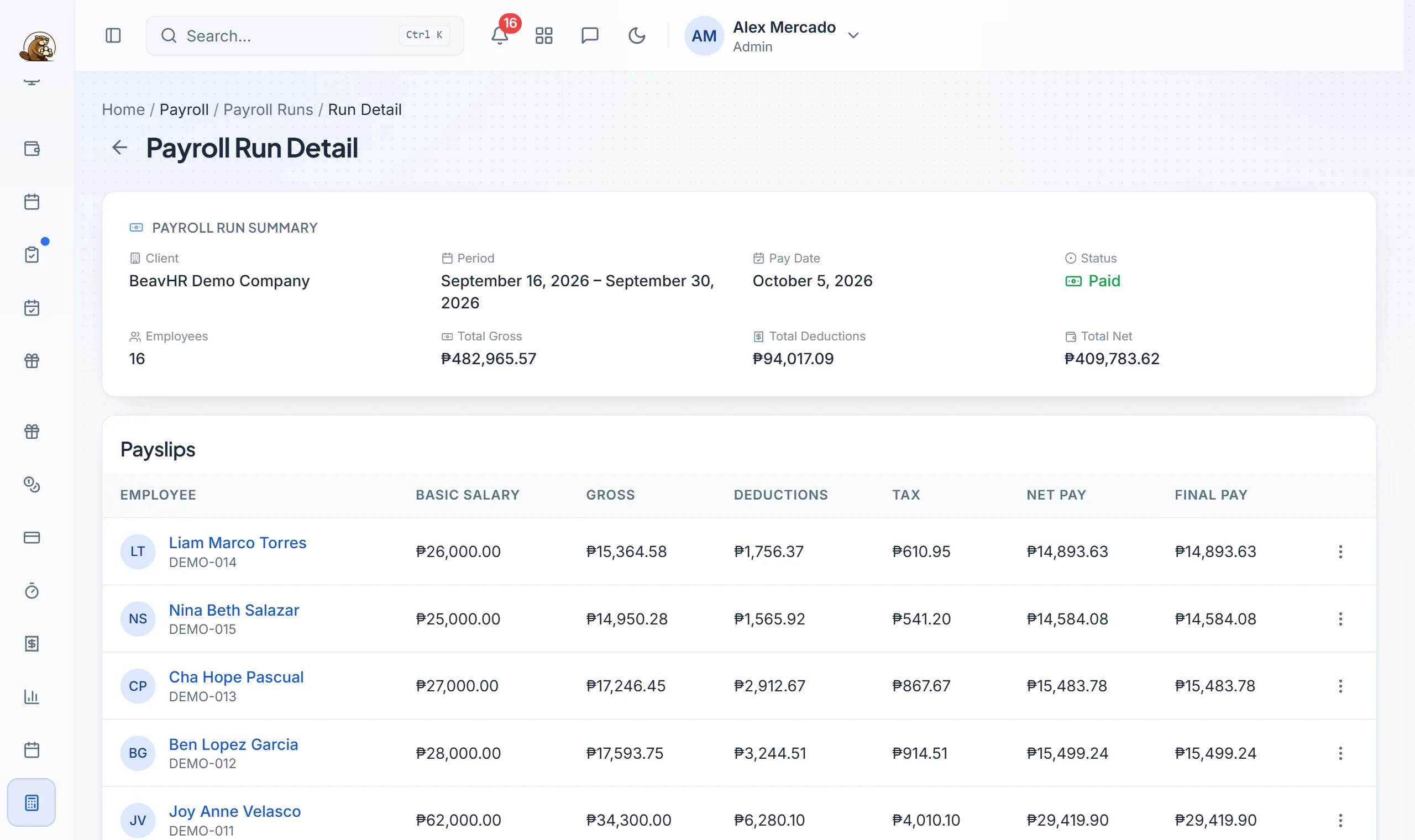
A payroll run: totals for the cutoff, and each employee's gross, deductions, tax and net pay.
Benefits and loans
What each employee is enrolled in, and what comes off their pay for it.
Benefit plansHMO, life insurance and allowance plans, with each employee's enrolment.
Government loansSSS and Pag-IBIG loans tracked and deducted through payroll.
My benefitsEmployees see their own plans and loans without asking HR.
Recruitment and careers site
From job post to signed-up employee without retyping anything.
Job postings and applicant pipelineMove applicants through your hiring stages on a board, and add walk-in applicants yourself.
Your own careers siteBranded careers pages you edit yourself. Applicants verify their email and can come back to update their application.
Interview schedulingSet interview times with applicants from their application.
Assessments and examsA question bank, a grading queue, results analytics and exam links you can send to applicants.
AI resume reading OptionalReads uploaded resumes into the application and scores how well each one fits the job.
Hire in one clickTurn an accepted applicant into an employee record.
Hiring analyticsSee how each job posting is performing.
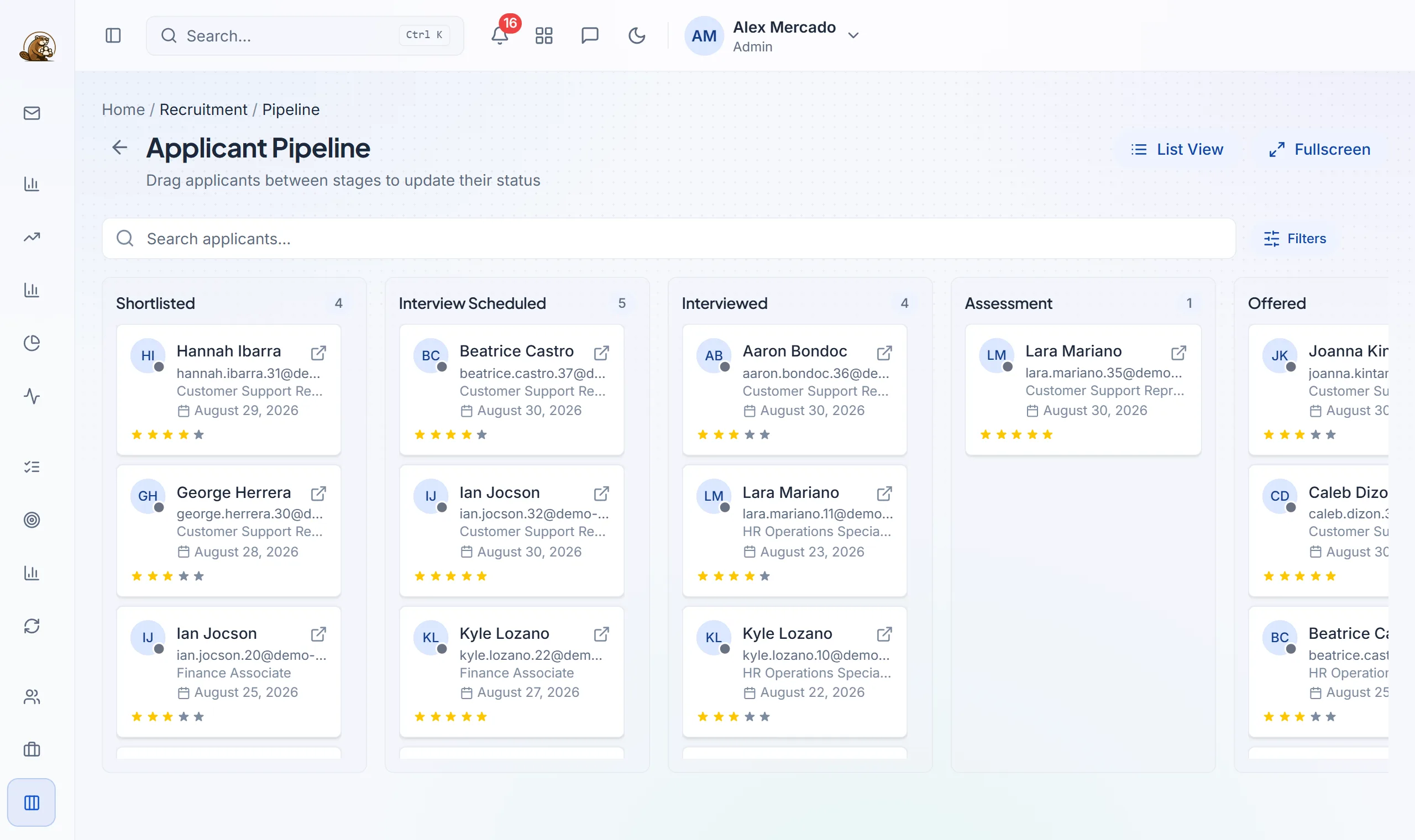
The applicant pipeline. Drag applicants between stages; each card shows the role, date applied and rating.
Performance, training and credentials
How people are doing, what they've learned, and what licences they hold.
Performance reviewsReview cycles with your own criteria and ratings.
GoalsGoals for each employee, tracked through the review cycle.
360° feedbackFeedback from peers, leads and direct reports.
One-on-onesRegular check-ins between team leaders and their people.
Training and LMSTraining programs and sessions, a training dashboard, and each employee's own training list.
Skills matrixWhich skills each employee has, at what level, across the team.
Credential trackingLicences, permits and certificates, with warnings before they expire.
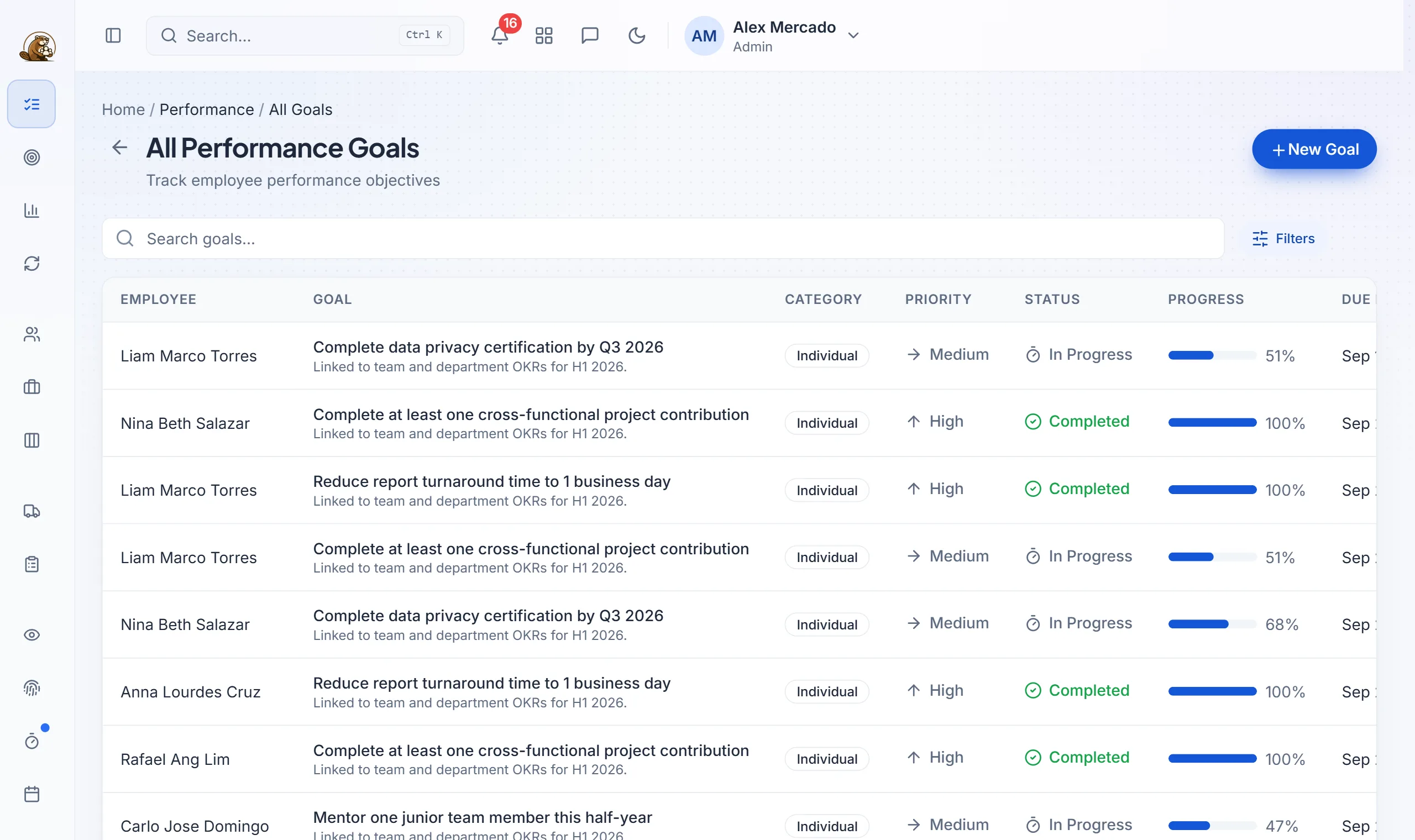
Performance goals across the company, with priority, status and progress.
Employee self-service and mobile
Employees answer most of their own questions, so they ask HR less.
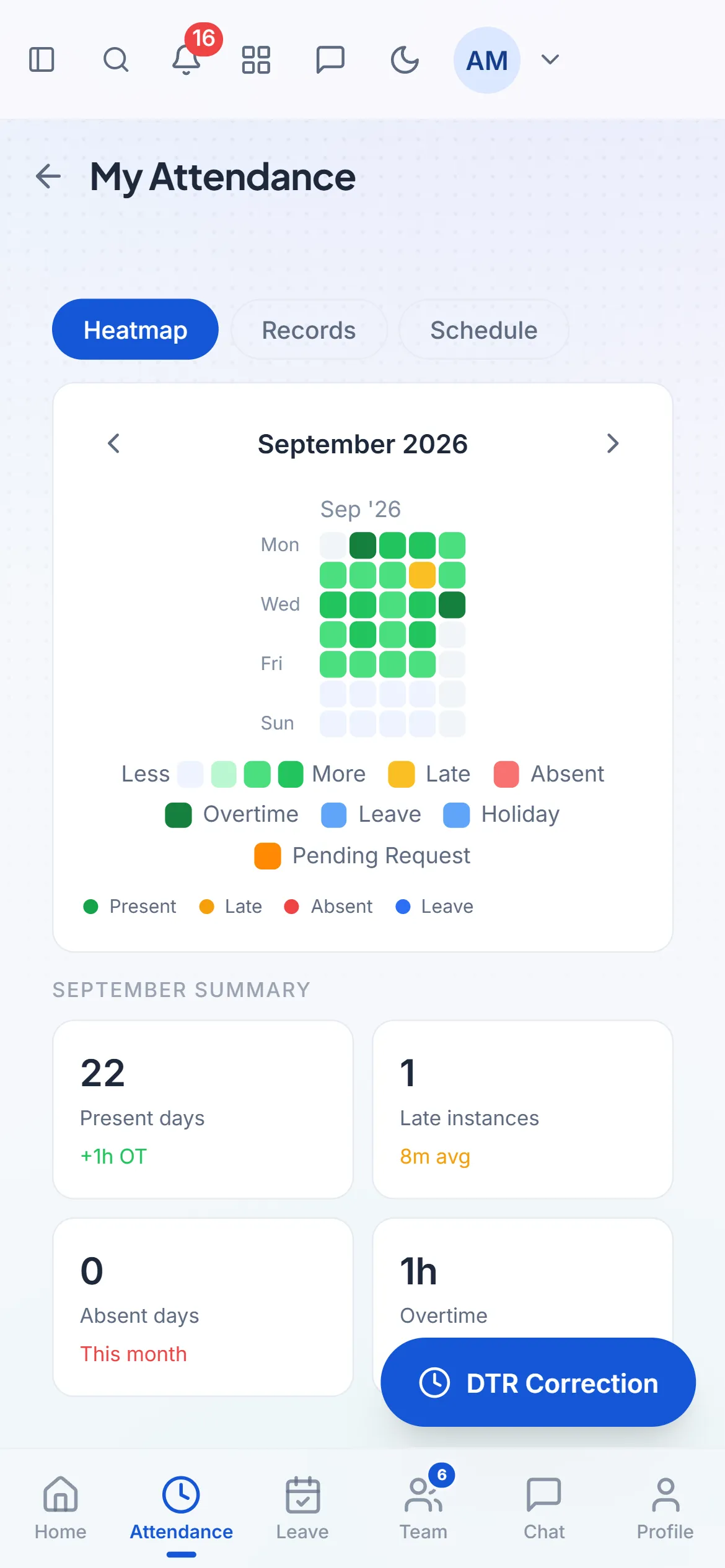
The web app on a phone: an employee's own attendance for the month.
Works on any phoneOn a phone the web app switches to a mobile layout with bottom tabs, with nothing to download from an app store.
Add it to the home screenEmployees save the web app to their phone's home screen and it opens like an app, to clock in, file leave, fix attendance, view payslips and chat.
AI HR assistant OptionalEmployees ask questions in plain words and can file leave, check balances or get a payslip explained.
Personal calendarMeetings, leave and schedules in one view.
Documents, e-signatures and discipline
Paperwork that gets signed, filed and found again.
Document libraryCompany folders and document types, plus each employee's own files.
E-signaturesRequests with several signers, and signing links for people outside the system. Signed PDFs are filed to the employee's record.
Notice to Explain and Notice of OffenseIssue notices, collect the employee's written reply and get them signed.
Company manualUpload your handbook. Employees read it by section and acknowledge it, and you see who hasn't yet.
Communication
Company news and team chat in the same app as everything else.
MessengerDirect and group chat with attachments, typing indicators and voice calls.
AnnouncementsCompany posts with comments and reactions, in every employee's feed.
NotificationsIn-app, real-time, email and push. Each person chooses what they receive.
HR concernsEmployees report issues, and similar reports are grouped together for HR.
Workforce monitoring
For office and remote teams working on computers.
Windows desktop appClock in and out from the desktop, with activity recorded while on the clock.
Live activitySee who's active right now across the team.
App and website usageTime spent per app and site, classified the way your company works.
Screenshots OptionalPeriodic screenshots during working hours, only if you turn them on.
Productivity reportsTrends per employee and team over any period.
Operations
Optional modules for the work around your people, switched on per company.
IT support deskTickets on a board, with categories and SLA targets.
IT assets and procurementIssued devices, vendors, purchase requests, purchase orders, invoices and spend analytics.
Fleet managementVehicles, driver assignments, mileage, fuel, maintenance and vehicle documents.
Work sites and branchesSites, rooms and areas, and who is assigned to each.
Seats and campaignsSeat and campaign assignments for BPO floors.
Branch checklists and shift handoverDaily store checklists and handover notes between shifts.
Industry presetsReady setups for logistics, healthcare, retail, manufacturing, construction, BPO, education, hospitality and professional services.
CRM and sales pipeline
Keep clients and deals in the same system as your team.
Pipelines and boardsMove leads and deals through your stages on a board.
Your own records and fieldsSet up the record types and fields your business tracks.
Tasks, notes and interactionsEverything said and done with a client, on their record.
Sequences and automationFollow-up sequences, automation rules and templates.
Dashboards and chartsSales dashboards built from your own data.
Import and duplicate checksBring in lists from Excel and catch duplicates before they pile up.
Security, reports and administration
Control who sees what, and a record of what was changed.
Roles and permissionsRoles with fine-grained permissions. Team leaders only see their own teams.
Security PINA PIN lock screen for shared and front-desk computers.
Session controlReview active sign-in sessions across your users.
Audit logsA record of who changed what, and when.
ReportsAttendance (tardiness, absences, overtime), leave use and balances, and payroll, all exportable to Excel.
In-app guide and toursStep-by-step tours and a help panel on every page, written for each role.
Quick searchJump to any employee or page from the keyboard.
Hosted by us or on your serverWe host and maintain it for you, or install it on your company's own server.
Screenshots are from the live demo. The company and people in them are made up.
Something for everyone who logs in
Each person sees the parts that matter to their job.
HR and payroll
Cutoffs closed from reviewed DTRs
Contributions and tax computed
201 files, notices and documents in one place
Team leaders
Approve leave and attendance fixes
See who's in on the team board
Run reviews and one-on-ones
Employees
Clock in from their phone
Payslips and leave balances anytime
File requests without paperwork
Owners and management
Payroll and attendance dashboards
Org chart and headcount at a glance
Audit logs of every change
How we get you started
We set it up with you rather than handing you an empty account.
Tell us about your company
Headcount, pay schedule and how you track attendance today. A short email is enough.
We walk you through it
A live session on your own setup, so you can see how your payroll and schedules would actually look.
We load your data and go live
We import your employees and configure your rules, then your team logs in.
Pricing that fits your company.
Your price depends on which modules you switch on and how many employees you have, so we quote each company directly. Send us a few details and we'll reply with a price for your setup.